A public IPTV playlist is a text file of stream addresses. Any player that reads M3U can turn it into a channel list, though the steps differ from app to app. This guide walks through a working setup in four common players, then shows how to add a programme guide and what to do when one channel fails.
Before you start
You need three things:
- A player installed on the device you will watch on.
- A playlist address, or a downloaded
.m3ufile. - A few minutes to test three channels before you trust the list.
Use the definition guide if the file format is new to you. The steps below assume you know the difference between a playlist and a single stream.
Get a playlist URL
Prefer lists that name their sources and publish their rules. The
iptv-org playlists are a
common starting point because they are organised by country and category and
their documentation explains what each slice contains. Copy the raw file
address, the one that ends in .m3u or .m3u8, not
the repository page that displays it.
A playlist URL can change or disappear without notice. If you save the address, save the date too, so you know how old the list is when it stops working.
Check the file before you load it
The first line should be #EXTM3U, and the entries should come in
pairs: an #EXTINF line followed by an address, repeated. A file
that opens with #EXTINF and never returns to the header was cut
short during download. The
playlist checker runs these checks and
reports the line number of each problem.
Set up in VLC
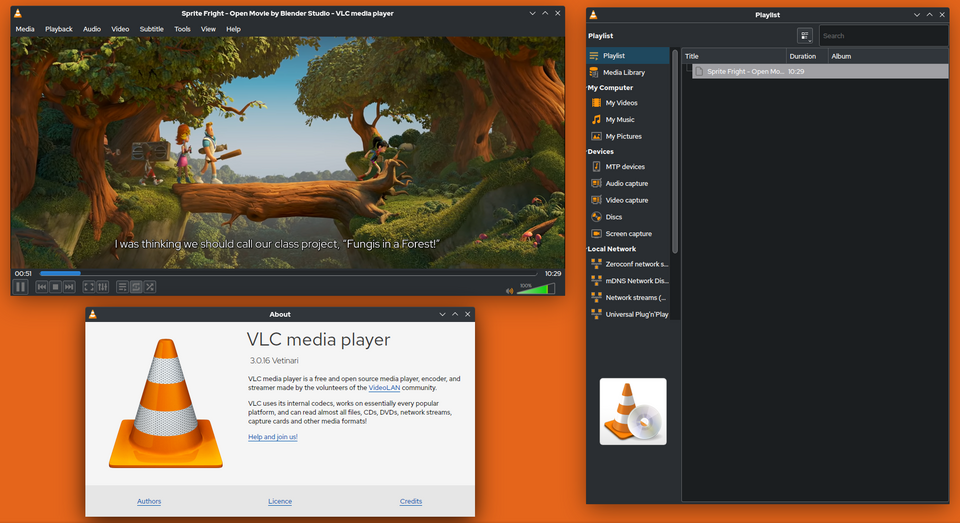
VLC is the quickest way to confirm that a playlist works before you configure anything else. Open Media › Open Network Stream and paste the URL (or use Open File for a downloaded file), then press Ctrl+L to list every entry. Double-click a channel with a short name and wait up to ten seconds for video. The full walkthrough, including how to read VLC's messages, is in the guide to opening an M3U playlist in VLC.

Set up on Android TV with TiviMate
TiviMate is an Android TV player that adds a guide grid and channel numbering. The paid unlock is what most of its documentation describes.
- Install TiviMate from the Play Store on your device.
- Open Settings, then Playlists, then Add playlist.
- Choose the option for an M3U playlist by URL, and paste the address.
- Save, then wait for the channel list to load. Large lists can take several minutes on a television.
- Set the guide source in the playlist settings once you have an EPG address (see below).
Set up in Kodi
Kodi loads playlists through the PVR IPTV Simple Client add-on. Set its M3U location to Remote path for a URL, or Local path for a saved file, then fully restart Kodi and check the TV section. The field names, the cache settings and the troubleshooting steps are in the Kodi setup guide.
Set up in IPTV Smarters Pro
IPTV Smarters Pro is a multi-platform player. It is designed around provider logins, so a public M3U list is added as a playlist rather than an account. The app moves this flow between builds, but it always asks for the same three fields: a playlist name, the M3U address and, optionally, an EPG address.
- Open the app and choose the option to add a new playlist.
- Pick the option for an M3U URL, then paste the playlist address.
- Give the playlist a name and save it.
- Open the playlist and check that the groups and channel names load.
Add a programme guide (EPG)
A channel list does not carry a schedule. A player links the playlist to an
XMLTV guide by matching the tvg-id attribute with the channel
identifier in the guide. If they do not match, the channels play and the guide
stays empty. Use an XMLTV address from a source you are allowed to use, then
compare a few identifiers in both files. The
live TV guide explains the
matching in more detail.
When a channel will not play
One failing channel is common and does not mean the whole list is broken. Test three channels from different hosts. If only one fails, the stream is probably offline or moved. If every channel from one host fails, that host has likely stopped serving the list. The guide to failing playlists lists the usual causes, and the HTTP status guide explains what error codes such as 403 and 404 usually mean.
Keep it within the rules
A public playlist being downloadable does not make every channel in it lawful to watch. Stick to sources that broadcast freely to your location, such as public service broadcasters and channels whose owners publish their own streams. If a channel refuses your country, do not try to get around the restriction; the regional restrictions guide shows how to read the error safely. The legal and safety notes cover the wider position.
Where to go next
Once a playlist plays, check how it was maintained with the maintenance guide, and compare free and paid options in the subscription comparison.